

Tartanleaf Publications
RadioBook Game Suite
Twelve interactive browser-based experiences. Learn by doing. Zero installation.
How It Works
- Browser-Based — Works on any modern computer, tablet, or smartphone
- Zero Installation — No apps to download, no accounts to create
- Instant Feedback — Learn from mistakes immediately with clear explanations
- Progress Tracking — See your improvement as you practice
- Free to Use — All games and drills are free for RadioBook readers and the amateur radio community
The Games
Six Interactive Games + Six Focused Drills
Six Interactive Games
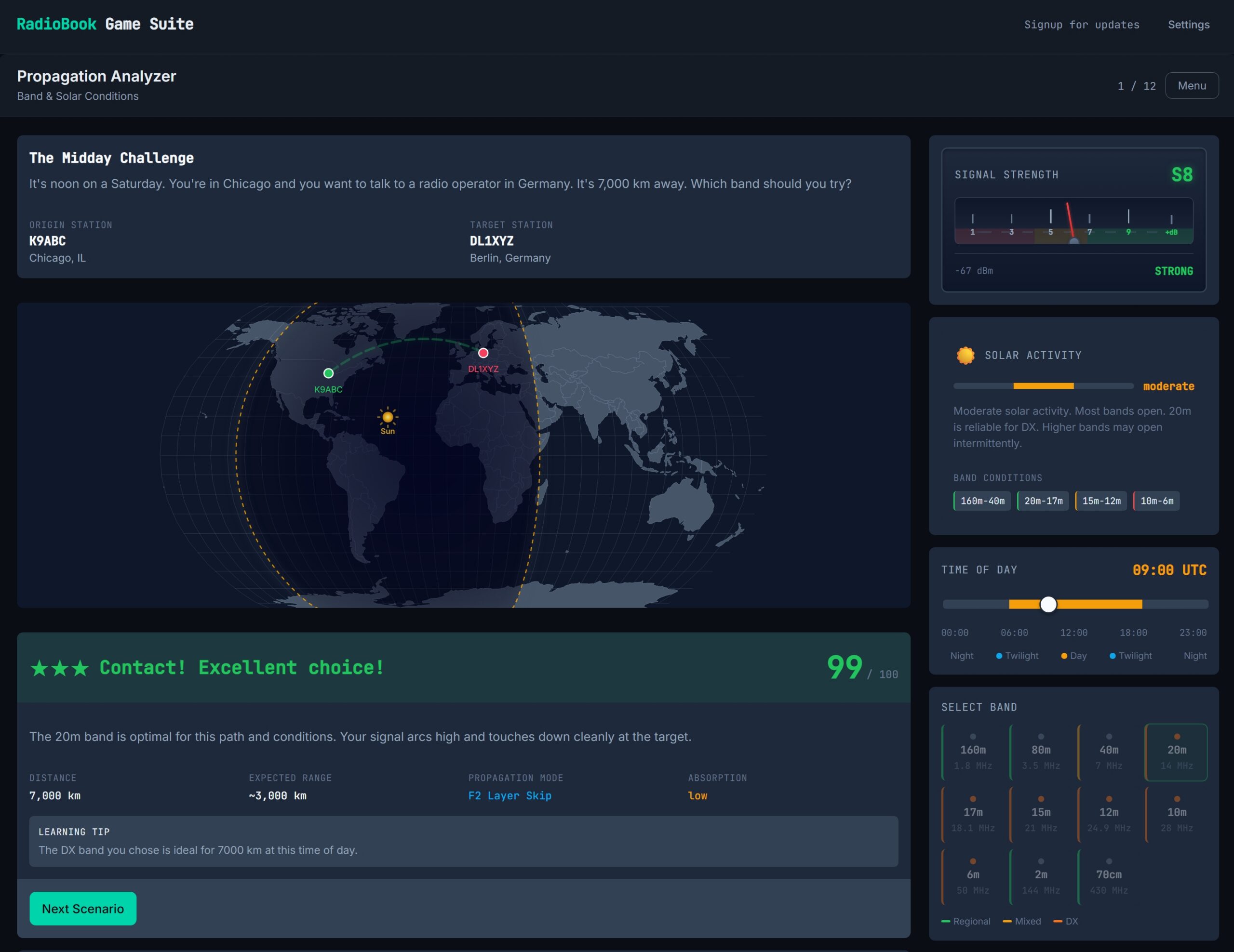
- Band Propagation Simulator — Visualize how radio signals travel through the ionosphere. Adjust frequency, time of day, solar conditions, and antenna type to see real-time propagation predictions.
- Circuit Builder Challenge — Build and troubleshoot circuits hands-on. Learn components, reactance, and impedance by doing. Observe signals at each stage and understand how the building blocks of radio actually function.
- DX Station — Practice phonetics, Q-codes, and operating procedures under time pressure. Perfect for building confidence before your first on-air contact.
- Interference Defense — Deploy filters and shielding to stop RFI. Learn interference mitigation strategies by diagnosing realistic radio problems with a virtual toolkit.
- License Class Ladder — Escape room-style progression through real exam question banks for USA (NCVEC) and Canada (ISED). Reinforces everything you have studied with interactive practice.
- Antenna Tuner — Match your antenna to your rig. Learn SWR, impedance matching, and how to tune for maximum power transfer across different bands.
Six Focused Drills
- Band Condition Estimation — Pick the right band at a glance based on time, season, and solar conditions. Build intuition for propagation without memorizing charts.
- Callsign Copy under QSB — Copy weak callsigns by ear as fading makes them appear and disappear. Develop real-world listening skills for challenging contacts.
- CW Training — Learn Morse code at your own speed with adjustable character speeds and Farnsworth spacing. Practice letters, numbers, and common Q-codes.
- Interference Audio ID — Name that noise by ear. Learn to identify different types of interference and electrical noise from their sound signatures alone.
- Phonetics Copying — Practice the NATO phonetic alphabet under pressure. Perfect for emergency communications and ensuring clear transmission.
- Q-Code Rapid-Fire — Know your Q-codes cold. Quick-fire drills for the most common Q-signals used in amateur radio operating.
Who This Is For
- RadioBook readers who want hands-on practice between study sessions
- Students preparing for licensing exams who need interactive practice
- Visual and kinesthetic learners who understand best by doing
- Anyone curious about amateur radio who wants to try concepts risk-free
- Experienced operators who want to explore propagation and circuits interactively
- Clubs and educators looking for classroom training tools
Release Status
All games and simulations are complete and ready to use. The RadioBook Game Suite runs entirely in your browser at radiobook.ca. Try them now — no account required.
Related Titles
The RadioBook series: 5 books, 12 experiences
- Welcome to Amateur Radio — Your first step into the world of ham radio
- How Radio Works — Understand the magic behind every transmission
- Getting Your License — Get licensed. Get on the air. Complete study guide.
- On The Air — Your practical operating guide for newly licensed hams
- Troubleshooting and Interference — When something goes wrong, know exactly what to do
Get RadioBook Updates
Get notified about new RadioBook releases, game updates, and amateur radio resources. No spam — unsubscribe anytime.
Frequently Asked Questions About the RadioBook Game Suite
What is the RadioBook Game Suite?
The RadioBook Game Suite is a free, browser-based collection of interactive learning games and drills for amateur radio. It covers propagation, electronics, operating procedures, interference mitigation, antenna matching, Morse code, phonetics, Q-codes, and callsign copying. The suite uses scenario-based learning and real-time simulation, with content aligned to ARRL and ISED sources for the United States and Canada.
Do I need to download or install anything to play?
No. The entire suite runs in your web browser on any modern device — desktop, laptop, tablet, or phone. There is no software to download, no app store to visit, and no account required. Simply visit radiobook.ca and start playing.
Is the RadioBook Game Suite free?
Yes. All games and drills are free to play at radiobook.ca. The suite is supported by the RadioBook book series and Tartanleaf Publications. Books are available for purchase separately if you want deeper explanations and structured learning paths.
Which amateur radio license exams does it cover?
The suite supports both the United States and Canada. For the USA, it covers Technician (2026–2030), General (2023–2027), and Extra (2024–2028) class exams using official NCVEC question pools. For Canada, it covers Basic and Advanced exams using ISED question banks. All jurisdiction-specific content is clearly labeled so you never study the wrong country’s regulations by accident.
Is this a replacement for an exam prep book or course?
No — it is the interactive practice layer. The suite pairs with the RadioBook book series, which provides the deeper explanations and structured theory. Use the books to learn concepts, then use the games to apply what you have learned. When a book introduces propagation theory, it sends you to the Band Propagation Simulator to prove you can choose the right band. When the game presents a challenging circuit, the book provides the deeper explanation.
How long does each game session take?
Games are designed for short sessions that fit into a busy day. Most take between 3 and 15 minutes: DX Station runs 3–5 minutes, Circuit Builder 5–10 minutes, Band Propagation 10–15 minutes, and focused drills 3–5 minutes each. License Class Ladder sessions run 15–20 minutes. You can save progress and resume later, making it easy to practice during commutes, lunch breaks, or between other activities.
Do I need prior electronics or radio experience?
No. The suite is designed for absolute beginners. Circuit Builder teaches electronics concepts through trial and error, not equations first. Band Propagation lets you see why bands behave differently instead of memorizing tables. Every wrong answer produces a plain-language explanation of why it was wrong and what the correct approach would be. Experienced operators also benefit from quick refresh sessions in DX Station, Interference Defense, and the focused drills.
How does the suite teach better than flashcard apps?
Flashcard apps teach memorization. The RadioBook Game Suite teaches understanding through a six-step pedagogical loop: present a realistic scenario, ask you to act, simulate the result, explain the outcome, reinforce the underlying concept, and reintroduce it later in a new context. When you choose the wrong HF band and your signal dies halfway to Berlin, you remember why 20 meters behaves differently at noon than at midnight. When a noisy LED driver wipes out 40 meters, you learn to think like a station engineer, not a test-taker.
What games and drills are included?
The suite currently contains six full games and six focused drills. Full games include: Band Propagation Simulator, Circuit Builder Challenge, DX Station, Interference Defense, License Class Ladder, and Antenna Tuner. Focused drills cover: Band Condition Estimation, Callsign Copy under QSB, CW Training, Interference Audio ID, Phonetics Copying, and Q-Code Rapid-Fire. Each targets a specific skill or concept with progressive difficulty and immediate feedback.
Does it work on mobile phones and tablets?
Yes. Every game is fully responsive and optimized for mobile devices. The interface adapts to smaller screens, touch controls replace mouse interactions, and session lengths are designed for on-the-go practice. You can play on your phone during a commute, on a tablet in the shack, or on a laptop at home — progress syncs through your browser’s local storage.