
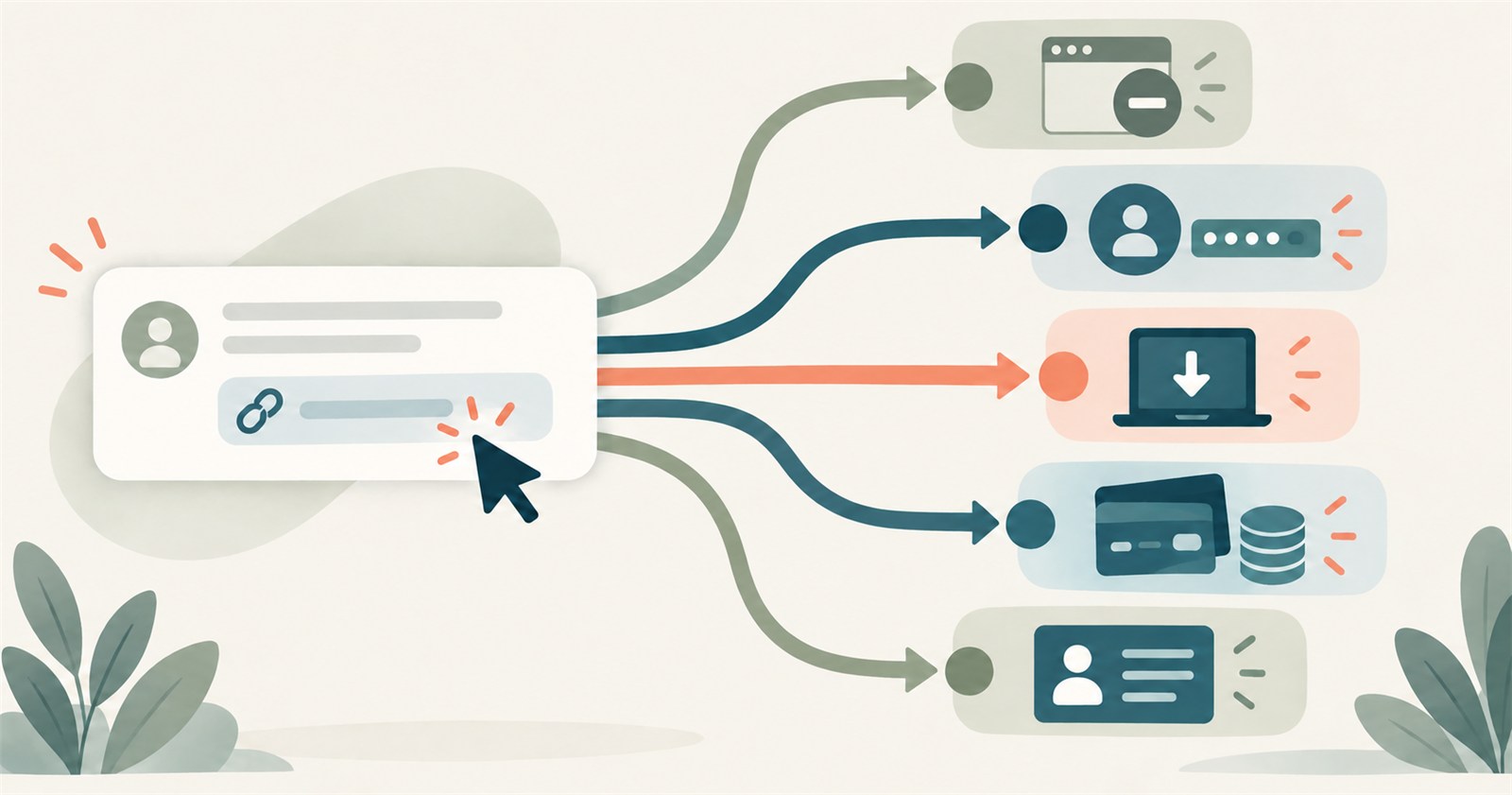
Clicking a suspicious link can produce an immediate wave of worry. It does not, by itself, tell you what happened to your device or account.
A page that opened and was closed is a different incident from entering a password, approving a sign-in, running a download, granting remote access or sending money. The most useful first question is therefore not, “Was I hacked?” It is:
What happened after the click?
Stop using the questionable message while you work through the answer. Do not click its link again, reply to it, call its telephone number or follow new recovery instructions supplied by the same source.
First, record what you actually did
Write down the approximate time, the device you used, what appeared on the screen and each action you remember taking.
Useful facts include whether you:
- only opened the page;
- entered a username, password, PIN or personal information;
- typed or shared a verification code;
- approved a sign-in, permission or authentication prompt;
- downloaded, opened or ran a file;
- installed software, pasted a command or allowed remote support;
- entered card or banking details;
- sent money; or
- supplied an identity number or document.
You do not need to diagnose the scam before asking for help. Accurate actions are more useful to an account provider, bank, workplace or family helper than a confident label.
If you clicked and then stopped
If the page opened but you did not enter information, approve anything, download or open a file, install software or make a payment, close the page and leave it closed.
Check the browser’s download list for anything you did not expect. Keep the operating system, browser and security tools current. If something downloaded or the device begins behaving unexpectedly, follow the device branch below.
A click alone does not prove that an account was taken over. It also does not prove that nothing happened. Watch for actual evidence such as a provider security alert, unfamiliar account activity, an unexpected download or unusual device behaviour.
Reach any affected service through its official app, a saved bookmark or an address you establish independently. Do not use the original message to check whether the original message was genuine.
If you entered a password, code or approval
Treat the affected account as the priority.
Reach the provider independently and use its current compromised-account or security-review process. Change the affected password if the provider directs you to. If that password was reused, change it on the other affected accounts as well.
An account is more than its password. Review the layers the provider makes available:
- recovery email addresses and telephone numbers;
- passwords, passkeys and multi-factor authentication methods;
- recent security events;
- signed-in devices and sessions; and
- connected applications and permissions.
For an email account, also check for forwarding addresses, filters, rules or delegated access you do not recognize. Email is often a recovery route for other accounts.
Do not approve another prompt or share another code because a caller says it will secure the account. A real code can still have been generated by an action the caller started.
If the account belongs to an employer or school, use its established support or security route. Personal recovery instructions may interfere with a managed system or its evidence.
If you downloaded, installed or granted device access
Identify the action precisely. Seeing a file in a download list, opening it, running it, installing software, pasting a command and granting remote control are different states.
Stop sensitive work on the affected device. Use another trusted device for urgent account or banking recovery when reasonably available.
If remote control or malicious activity appears to be continuing, disconnecting the affected device from the network can interrupt that connection. Record what you observed before removing random applications or settings.
Use the operating system’s current security tools or another security product you already trust. Update it, run the appropriate scan and record what it identifies, removes or leaves unresolved. Do not install a cleaner suggested by the pop-up, message or person who created the alarm.
A scan that finds nothing is one piece of evidence. It does not inspect every online session, account permission, recovery setting or file that may already have been copied.
Do not jump automatically to a factory reset. A reset can be appropriate in some situations, but it also affects files, applications, accessibility tools, recovery keys and the ability to restore the device. Establish the actual state and a recovery plan first.
If money or card details were involved
Contact the actual bank, card issuer or payment provider promptly through a known route. Use the number on the card, the provider’s established app or another contact route you already trust.
Describe the transaction accurately:
- Did you send or approve the payment after being deceived?
- Did someone else access the account?
- Is the payment pending or complete?
- Which card, account or payment service was involved?
- Were card details, a PIN, credentials or verification codes exposed?
Different payment methods and incident types can have different procedures and limits. Ask the provider what remains possible and record the case number and result. Do not assume that a transfer will be reversed or reimbursed.
Be cautious of anyone who later promises guaranteed tracing, recovery or return of funds for an advance fee.
If identity information was disclosed
Record exactly what left your control: a number, a photograph, a document, an account login or some combination of these.
Exposure is not automatically the same as observed identity misuse. A photographed document is also not always handled the same way as a physically lost document. Some reports can cancel a document, so use the current process of the organization that owns the affected record.
The correct actions depend on the information, country, province or state, and whether any misuse has actually appeared. Keep Canadian and United States recovery routes separate.
Preserve enough evidence without reopening the risk
Keep what may help a provider understand the incident:
- the original message;
- relevant screenshots;
- dates and approximate times;
- receipts and transaction information;
- file or application names;
- provider case numbers; and
- a short log of the actions you took and their results.
Do not click the suspicious link again, reopen a risky attachment or reconnect with a questionable support session merely to collect more evidence.
Keep passwords, PINs, verification codes, full payment-card numbers and recovery phrases out of an ordinary incident log.
A simple decision card
- Stop: Is contact, disclosure, payment or device access still continuing?
- Identify: What exactly happened after the click?
- Choose the affected state: account, device, money, card or identity information.
- Verify independently: Which genuine provider owns that state?
- Act and record: What did the provider or security tool change, and what remains uncertain?
Stopping early is useful. Reporting exactly what happened is useful. Neither requires blame.
About this guidance
Greg Weir writes the Smart Tech for Real People series for readers who want practical technology guidance in plain language. Learn more about Greg Weir and browse Books by Greg Weir. This article uses the same calm verification approach: stop, identify what changed, reach the real provider independently and record what follows. For a fuller guide to scam patterns, impersonation, identity theft, and recovery, see Smart Tech for Real People: Scam Safety.
Sources checked
- Canadian Centre for Cyber Security – Don’t take the bait: Recognize and avoid phishing attacks
- Canadian Centre for Cyber Security – Smishing: Protect yourself from SMS attacks
- Canadian Centre for Cyber Security – Spotting malicious email messages
- U.S. Federal Trade Commission – How To Recognize and Avoid Phishing Scams
- Apple Support – If you think your Apple Account has been compromised
- Google Account Help – Secure a hacked or compromised Google Account
Provider controls and reporting routes change. Use the current instructions from the organization responsible for the affected account, payment method or identity record.